Build a business website with ChatGPT: step-by-step guide
Build a business website with ChatGPT: step-by-step guide

TL;DR:
- Using ChatGPT as your DIY web assistant enables small businesses in NJ and NV to craft targeted, optimized websites without high costs. By planning with a clear blueprint, iteratively generating content and code, and thoroughly testing before launch, owners can build a strong local presence organically. Success depends on personal input, local knowledge, and ongoing updates, rather than relying solely on AI tools.
You want a website that brings in customers, ranks on Google, and actually represents your business well. But hiring a developer feels expensive, and those drag-and-drop builders seem to produce cookie-cutter results that look just like everyone else's site. Here's the thing: ChatGPT can act as your personal assistant through the entire website creation process, from writing your homepage copy to generating clean HTML code, and it works whether you're running a roofing company in Newark or a boutique spa in Las Vegas.
Table of Contents
Key Takeaways
| Point | Details |
|---|---|
| ChatGPT is an assistant | It helps plan, write, and generate code, but you handle hosting and deployment. |
| Clear prompts matter | Break work into steps and use specific instructions for best output quality. |
| Manual review is crucial | Always test and refine ChatGPT's output before going live. |
| Local focus boosts results | Prompt ChatGPT with New Jersey or Nevada details for better SEO and personalization. |
| Results depend on strategy | Strong outcomes require good strategy, measurement, and ongoing updates. |
What you need to get started
Before you type a single prompt, it helps to walk in with the right setup. The good news is the barrier is low. You need access to ChatGPT, which is available through a free account at OpenAI's website. Even the free version handles planning, copywriting, and basic code generation well enough to get a site off the ground. If you're doing heavier coding work or need faster responses, a paid plan is worth considering, but it is not required.
Here's one thing to be clear about upfront: ChatGPT does not handle hosting or deployment itself. It cannot buy your domain, upload your files, or connect your site to a server. Think of it like a brilliant contractor who drafts excellent blueprints and frames the walls but doesn't own the property. You handle the land.
What you need to have ready:
- A ChatGPT account (free or paid)
- A clear idea of your business goals (leads, bookings, sales, awareness)
- Knowledge of your target audience in New Jersey or Nevada
- A domain name registered through a registrar like Namecheap or GoDaddy
- A hosting plan from providers like Bluehost, SiteGround, or WP Engine
Here's a quick breakdown of what ChatGPT handles versus what you manage yourself:
| Task | ChatGPT can help | You handle it |
|---|---|---|
| Homepage copy | Yes | No |
| HTML/CSS/PHP code | Yes | No |
| SEO keyword research | Yes | No |
| Domain registration | No | Yes |
| Web hosting | No | Yes |
| File upload/deployment | No | Yes |
| Design mockups | Partial | Mostly you |
| Analytics setup | Guidance only | Yes |
Following a structured website design process before you start prompting will save you hours of back-and-forth later.
Pro Tip: Before your first session with ChatGPT, write down the five most important things your website should do. That clarity will make every prompt sharper and every output more useful.
Blueprinting your website with ChatGPT
Once you've assembled your requirements, you're ready to draft a focused website blueprint using ChatGPT. This is the step most people skip, and it's the reason so many AI-assisted websites end up feeling scattered.

The best practice is to plan your sitemap and requirements first, then prompt ChatGPT for individual components. Think of the blueprint as your construction permit. Nothing gets built without it.
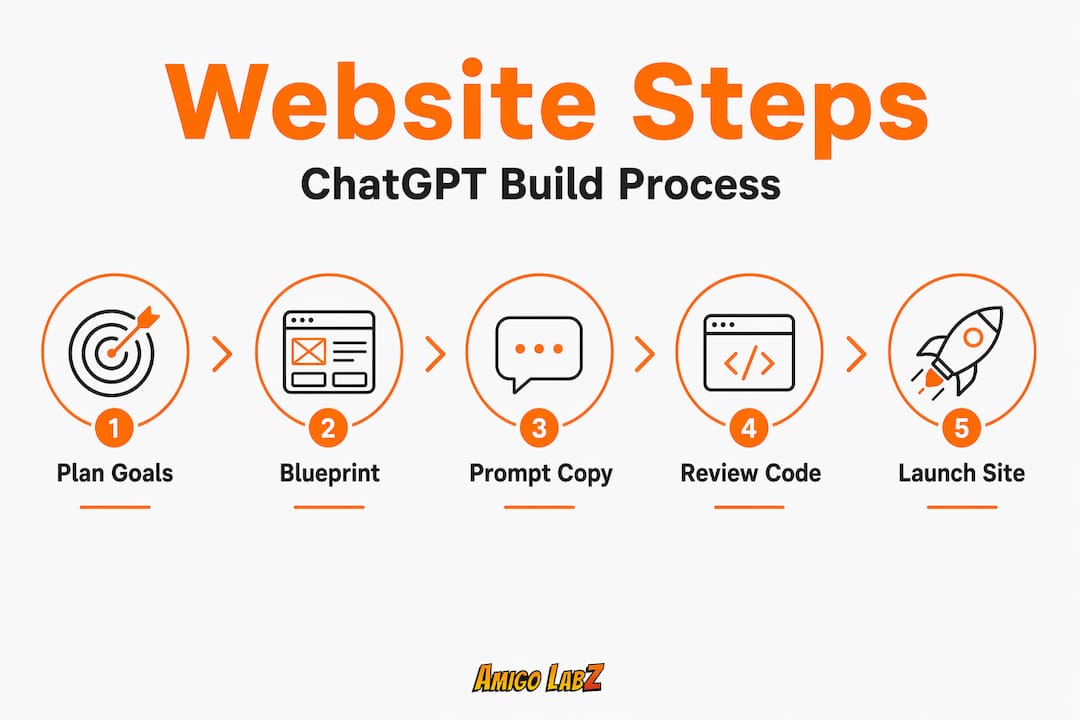
Follow these steps to create your blueprint:
- Open a new ChatGPT conversation and describe your business in two to three sentences, including your location (NJ or NV), your services, and your ideal customer.
- Ask ChatGPT to suggest a sitemap with page names, a one-line purpose for each page, and a recommended order.
- Request a basic SEO keyword plan using your location and primary services as anchors.
- Ask for a short audience profile that you can reference throughout the project.
- Save everything in a document before moving to the next phase.
When writing your prompts, always include:
- Your city or region (e.g., Cherry Hill, NJ or Henderson, NV)
- Your primary service or product
- The action you want visitors to take (call, book, buy)
- The tone you want (professional, friendly, authoritative)
- Any competitors or brands whose style you admire
Here's an example of a well-structured prompt:
"I run a landscaping business in Trenton, NJ. My target clients are homeowners aged 35 to 60 who want reliable, affordable yard maintenance. Create a five-page sitemap with page titles, purposes, and three local SEO keywords per page. Keep the tone friendly and professional."
That level of detail makes a real difference. Prompt clarity, breaking work into steps, and outlining the task all improve the quality of ChatGPT's output significantly. Vague prompts produce generic content. Specific prompts produce pages that sound like your business.
For business owners working on SEO prompt strategies, including location signals in your blueprint phase plants those keywords early, making every subsequent page easier to optimize. If you want more background on improving online visibility in your local market, that foundation starts here.
Pro Tip: Start with your homepage and about page first. These two pages force you to articulate what makes your business different, and that clarity will strengthen every other prompt you write.
Generating website copy and code iteratively
With your blueprint in hand, it's time to bring each section to life carefully, and with plenty of hands-on review. The word "iteratively" is key. Nobody gets a perfect page on the first try, and trying to generate your entire website in one massive prompt is one of the most common and costly mistakes business owners make.
Work page by page. Here's a reliable workflow:
- Prompt for homepage headline, subheadline, hero section copy, and a call to action.
- Review and edit the output. Adjust tone, add your personality, and check that facts are accurate.
- Ask ChatGPT to convert the approved copy into semantic HTML5 with basic inline CSS.
- Repeat the same process for your Services page, About page, and Contact page.
- Ask for a simple navigation structure and footer HTML that ties the pages together.
- Request any additional elements, such as a contact form, a Google Maps embed, or a testimonials section.
ChatGPT can generate front-end code efficiently, but you must review and iterate it yourself to ensure it's functional and responsive across different devices. Paste code into a sandbox environment like CodePen or a local file folder in your browser to see how it looks before moving forward.
Here's a reference table of constraints to build into your prompts for better output:
| Constraint | Why it matters | Example prompt phrasing |
|---|---|---|
| HTML5 semantics | Better SEO and accessibility | "Use semantic HTML5 tags" |
| Mobile responsiveness | Most NJ/NV users browse on phones | "Include responsive CSS" |
| Local keywords | Targets your market | "Include 'Las Vegas plumber' in H1" |
| Accessibility | Inclusion and legal compliance | "Add alt text to all images" |
| Clean, commented code | Easier for you to edit later | "Add code comments explaining each section" |
One thing worth noting: keeping prompts simple and direct, while specifying constraints, produces cleaner code and more usable copy. Asking for everything at once often leads to bloated output that's hard to edit. Break it down. Review every piece before requesting the next one.
Refer back to your website design process notes throughout this phase. If you find the process is moving faster than expected and you want professional polish on specific pages, tailored website solutions are available for NJ and NV business owners who want expert eyes on their work.
Pro Tip: Review code in a sandbox or a simple local browser environment before finalizing. A five-minute preview check will catch layout errors that would take an hour to untangle after deployment.
QA, hosting, and going live
Before your new site welcomes customers, you need to make sure everything works as intended from technical details to user experience. This phase is where many DIY projects stumble. Skipping quality assurance (QA) means launching a site that might look broken on mobile, load slowly, or have forms that don't actually send messages.
Before you hit publish, check every one of these items:
- All links work and navigate to the correct pages
- Contact forms submit successfully and send to your email
- Images load on both desktop and mobile
- Site loads in under three seconds (test with Google PageSpeed Insights)
- SEO meta titles and descriptions are filled in for every page
- Analytics tracking code (Google Analytics or similar) is installed
- SSL certificate is active so your URL shows "https://"
- No placeholder text like "Lorem Ipsum" remains anywhere
A thorough QA process should also include a checklist covering hosting, analytics, and security, not just whether the pages render visually. Security is easy to overlook but critical, especially if you're collecting customer data through forms.
For affordable hosting in New Jersey and Nevada, small businesses generally do well on shared hosting plans that cost between $3 and $15 per month. Once your site grows, a VPS (Virtual Private Server) plan gives more control. Popular options include Bluehost, DreamHost, and Kinsta for WordPress-based builds.
Steps to go live:
- Purchase a hosting plan and domain if you haven't already.
- Upload your HTML, CSS, and image files via the hosting provider's file manager or FTP client.
- Connect your domain to your hosting through the DNS settings at your registrar.
- Install your SSL certificate (most hosts provide this free through Let's Encrypt).
- Visit your live URL and test every page and function from a fresh browser window.
- Share with two or three employees or trusted colleagues and collect feedback.
Reviewing your site against web accessibility guidelines is also a strong business practice. Making your site accessible benefits users with disabilities and reduces legal risk.
Pro Tip: Always test on both mobile and desktop using different browsers. Chrome, Safari, and Firefox can display the same page differently, and catching those issues before launch protects your first impression.
What kind of results can you expect?
With your site live, let's look at the business impact you can expect from taking this AI-assisted approach. Results vary depending on your market, the quality of your prompts, and your ongoing effort after launch, but real data gives us a useful benchmark.
One case study tracked 16 months post-rebuild and reported 380,000 impressions, a 0.4% click-through rate (CTR), and an average search position of 18.5. That's meaningful traction for a small business that started with zero organic visibility. The gains weren't instant. They built over months as the site aged, earned links, and continued receiving content updates.
Factors that influence how well your ChatGPT-built site performs:
- Quality and specificity of your original prompts
- How thoroughly you reviewed and edited AI output before publishing
- Whether you're targeting focused local keywords (NJ or NV specific)
- How often you add new content, blog posts, or service updates
- Whether you have external links pointing to your site from other local sources
- How fast and mobile-friendly your final code is
The takeaway here is not that ChatGPT is magic. It's that a well-planned, well-executed AI-assisted website can compete seriously in local search, especially in markets like New Jersey and Nevada where many small businesses still have underdeveloped digital presences. Explore the SEO benefits of ChatGPT websites if you want to go deeper on what drives those organic gains.
Realistic expectations matter. A site built in a weekend won't outrank established competitors in month one. But a site built thoughtfully with ChatGPT, reviewed carefully, and updated consistently can generate real leads within three to six months.
Why your approach matters more than the tools
Here's a perspective we've developed from working with business owners across New Jersey and Nevada: most people who struggle with AI-assisted websites aren't failing because the tool is weak. They're failing because they're treating ChatGPT as a replacement for strategy rather than a partner in executing one.
Many small businesses assume the right software alone guarantees results. It doesn't. The business owners who win are the ones who bring their own knowledge into every prompt. They know which streets their customers drive home on. They know what questions customers ask before calling. They know why a competitor across town is losing business. ChatGPT can't know any of that unless you tell it.
Businesses in New Jersey and Nevada have a real competitive edge available to them: local specificity. A website that mentions your town, references nearby landmarks, and speaks to regional pain points will outperform a generic site every time. That local texture has to come from you.
Quote: "Tools are helpful, but your vision builds your brand."
We've seen business owners generate strong results by weaving their personal stories, their values, and their community ties into every page. That content can't be faked, and it's the one thing your competitors can't easily copy. Reading through local marketing insights helps frame how to translate that local knowledge into actual website content.
Treat ChatGPT as your co-writer and code assistant. Review everything it produces. Inject your voice, your expertise, and your local context. That combination is what creates a website that doesn't just exist online but actually earns business.
Take your next step with local experts
You now have a full framework for building your business website using ChatGPT. You know what tools to gather, how to blueprint your site, how to generate and review copy and code, and how to launch and measure results. That's a lot of ground covered, and most business owners can absolutely do this themselves.

But some steps take longer than expected, and some results need an experienced eye to unlock. Whether you need help structuring your local SEO, cleaning up AI-generated code, or building a site that competes in dense markets like Newark or Las Vegas, we're here to help. At Amigo Labz, we work with NJ and NV business owners directly, building relationships while solving real problems. Check out our tailored website support or explore how our local SEO expertise can accelerate what you've already started. A free strategy call is always available, and we'd love to hear about your business.
Frequently asked questions
Can ChatGPT fully build my website from start to finish?
No. ChatGPT is not a drag-and-drop builder and does not handle hosting or deployment, so you still need to manage those steps yourself alongside any review and testing.
Is technical knowledge required to use ChatGPT for building a business website?
A basic understanding of your business goals is enough to start, but you'll need to follow simple steps to review your output and connect your files to a hosting provider before going live. Clear blueprints and refined outputs reduce the technical burden significantly.
How do I make sure the site is optimized for local SEO using ChatGPT?
Prompt ChatGPT to include location keywords, your business hours, and Google Maps embed code relevant to your NJ or NV location so local signals appear throughout your copy and structure.
Can ChatGPT help with website updates and maintenance?
Yes. Iterative prompting for new components means you can return to ChatGPT whenever you need copy tweaks, new service pages, or code updates as your business evolves.
Is it possible to achieve strong SEO results with a ChatGPT-assisted website?
Yes, and measurable search performance gains have been documented in real case studies, though results depend on how well the site is built, optimized for local intent, and maintained over time.
Recommended