Small Businesses: Local Ads on Google That Deliver Leads in 2–4 Weeks
Small Businesses: Local Ads on Google That Deliver Leads in 2–4 Weeks

If you run an eligible local service business, Local Services Ads are usually the fastest, lowest-risk way to land at the top of local search without bidding on keywords. They work on a pay-per-lead model, so you pay when a customer actually contacts you, not when someone glances at your ad. Regular Google Ads still earns its place for research-phase traffic and remarketing. Start today by checking your eligibility and claiming your profile.
TL;DR:
- Local Services Ads appear above organic search results and charge per lead, making them more cost-effective for phone-based service businesses.
- Eligibility depends on business category, legal licensing, liability insurance, and background checks, with verification typically taking two to four weeks.
- Most small firms should start with a monthly budget of at least $1,000 to $2,500, focusing on response time and review collection in the first two months.
- Optimizing the Google Business Profile and seeding reviews beforehand significantly speeds up approval and improves lead quality.
- Converting leads with quick responses, strong reviews, and detailed tracking is essential to maximizing ROI from Local Services Ads.
Local Advertising Google: Local Services Ads vs. Google Ads
The two products solve different problems, and mixing them up wastes money. Local Services Ads sit above the regular Search results, even above the map pack, and they carry the Google Guarantee badge that signals a vetted business. Regular Google Ads (often called Local Ads when optimized for store visits or calls) show up below that, competing on keywords and bids.
The cost models diverge just as much. LSAs charge per lead, whether that's a phone call, a message, or a booking. Google Ads charges per click, regardless of whether that click ever turns into a customer. WordStream's data puts the average cost per click near $5.42, with cost per lead closer to $66.69 across accounts they track, though local service categories vary widely from that baseline.
Control is the trade-off. Google's automated matching decides who sees your LSA listing based on your service area, reviews, and responsiveness. You don't write ad copy or pick keywords. With Google Ads, you control the message, the landing page, and exactly which searches trigger your ad, but that control demands more setup time and more ongoing management.
Here's how the two stack up for a small service business deciding where to start:
- Placement: LSAs appear above organic and paid Search results; Google Ads compete lower on the page.
- Billing: LSAs charge per qualified lead; Google Ads charge per click.
- Setup effort: LSAs need verification and licensing documents; Google Ads need keyword research and ad copy.
- Best fit: LSAs suit phone-first or in-home service businesses; Google Ads suit businesses that need control over messaging or serve categories LSAs don't cover.
If your business qualifies for LSAs and converts mostly by phone, start there. Add Search once you have LSA leads flowing and want to capture the customers who are still researching before they call. For a side-by-side breakdown by category, our comparison of LSAs and Google Ads covers more edge cases.
Who Qualifies for Local Services Ads and How Verification Works
Not every business can run LSAs, and eligibility varies by market. Google built the program around categories where trust matters most before a customer lets someone into their home or hands over money: plumbers, electricians, HVAC technicians, locksmiths, movers, house cleaners, landscapers, and similar trades. Legal and financial services have their own separate LSA verification track. Availability differs by country and even by metro area, so check your specific category and location before assuming you're covered.
Verification is where most businesses stall. Google checks:
- Business identity and ownership documents
- Active licenses required in your state or municipality
- Liability insurance coverage
- Background checks on the business owner and, in some trades, on employees
Most applicants complete verification in two to four weeks , according to Google's own guidance on the process. Delays usually come from mismatched business names across documents, expired licenses, or background check providers needing extra identity confirmation.
Once verified, you get the Google Guarantee badge next to your listing. That badge does two things at once: it reassures a nervous customer comparing three plumbers at 9 p.m., and it factors into how Google ranks your listing among competitors. Businesses that skip verification, or let it lapse, lose both the badge and the ranking boost that comes with it.
What Local Services Ads Cost and How Billing Works
You pay for leads, not clicks, and Google defines a lead broadly. A phone call that connects, a message through your listing, or a booking request each counts as a chargeable lead once you respond. If a call goes unanswered, or a message clearly isn't a real service inquiry (a wrong number, a solicitation, a duplicate), you can typically dispute the charge and get credited back.
Per-lead pricing swings hard by trade and market. A locksmith lead in a mid-size city might run $15 to $30. An HVAC replacement lead in a competitive metro can run well past $50. There's no single number that applies across categories, so don't budget off someone else's line item.
Pro Tip: *Work the math backward instead of forward. Take your average customer value, subtract your margin requirements, and that tells you the maximum you can afford to pay per lead.
Budget management inside LSAs comes down to a few levers:
- Set a weekly budget cap so a slow week doesn't suddenly become an expensive one
- Monitor your dispute rate; a high rate of invalid leads usually points to a targeting or service-area problem, not bad luck
- Adjust your service area radius if leads are coming from too far outside your actual coverage
- Review lead quality weekly for the first two months, since early data shapes how Google matches you going forward
The WordStream cost data suggests SMB accounts commonly start with monthly budgets between $1,000 and $2,500, which works as a reasonable starting range for LSAs too, even though the billing mechanics differ from standard Search campaigns.
How to Set Up Your First Local Services Ads Campaign
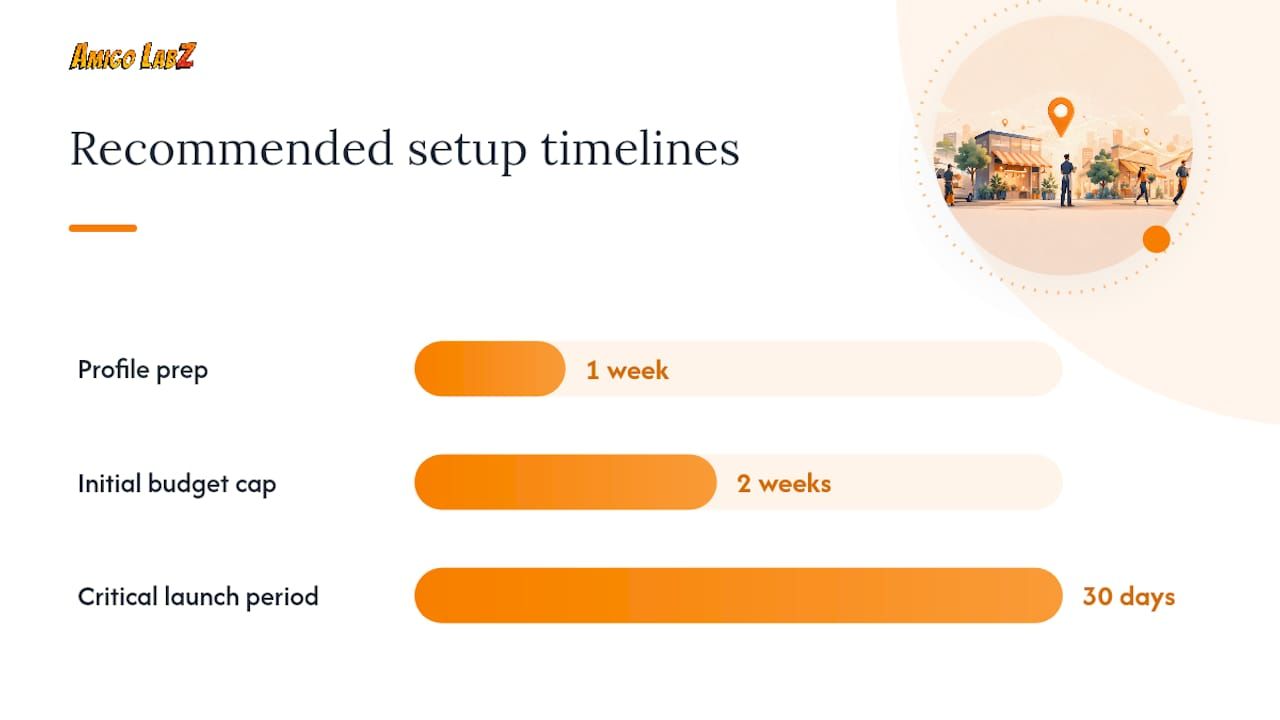
Before you touch the application, get your groundwork done. A thin Google Business Profile with three reviews and no photos will slow your approval and hurt your early lead flow even after you're verified. Spend a week tightening that up first.
- Optimize your Google Business Profile. Fill in every service category, add real photos, and make sure your hours and service area are accurate. This also feeds your regular local search visibility, so it's not wasted effort even outside LSAs.
- Ask recent customers for reviews. Seeding reviews before verification speeds up early ranking and gives new visitors something to trust before you have LSA-specific reviews yet.
- Claim or create your LSA profile at the Local Services Ads portal and select every service category that genuinely applies to your business.
- Define your service area realistically. A wider radius means more leads, but also more wasted spend if you can't service the outer edges profitably.
- Upload licenses and insurance documents. Match the business name exactly to how it appears on your other legal paperwork, since mismatches are the top cause of delay.
- Complete background checks for yourself and any employees the category requires.
- Set your weekly budget and lead preferences , starting conservative until you see how leads convert.
Pro Tip: Cap your budget low for the first two weeks after going live, even if Google suggests a higher number. A tight cap forces the algorithm to send you fewer, better-matched leads while you dial in your response process, instead of flooding you with volume you're not ready to handle.
Once you go live, the first 30 days matter more than any month after. Respond to every call and message within minutes, not hours. Track which leads convert to booked jobs and which don't, and flag disputes quickly. For a walkthrough of the map and search visibility side that pairs with this, our guide to launching local search ads covers the setup sequence in more detail.
Turning LSA Leads Into Paying Customers
Getting the lead is half the job. Converting it is the other half, and most businesses lose more money here than they do on ad spend.
Reviews are the single biggest lever inside your control. Businesses with more reviews and higher ratings consistently rank higher within the LSA placement , since Google's matching algorithm weighs both volume and recency, not just your star average. A business with 80 reviews at 4.7 stars will usually outrank one with 12 reviews at 4.9 stars in the same category and area.
Tracking matters just as much as the leads themselves. Set up:
- A unique forwarding number for LSA calls so you can separate that traffic from your regular phone line
- CRM integration that logs every lead automatically instead of relying on someone writing it on a sticky note
- Offline conversion imports so Google knows which leads actually became paying jobs, which improves future matching
Call tracking and offline conversion data are close to mandatory for any local advertiser relying on phone leads, since without them you're optimizing blind. A tool built for lead management and CRM routing can handle this without adding manual work to your day.
Response speed decides more deals than people expect. Answer the phone live when you can. If you miss a call, text back within five minutes with a specific time you'll call. A generic "we'll get back to you" script loses jobs to the next contractor on the list who answered on the first ring.
Once your LSA account is converting reliably and you want more volume than your service area can produce organically, that's your signal to layer in Search campaigns for the research-phase customers LSAs don't reach.
How Much Should You Budget, and When Do You Add Search?
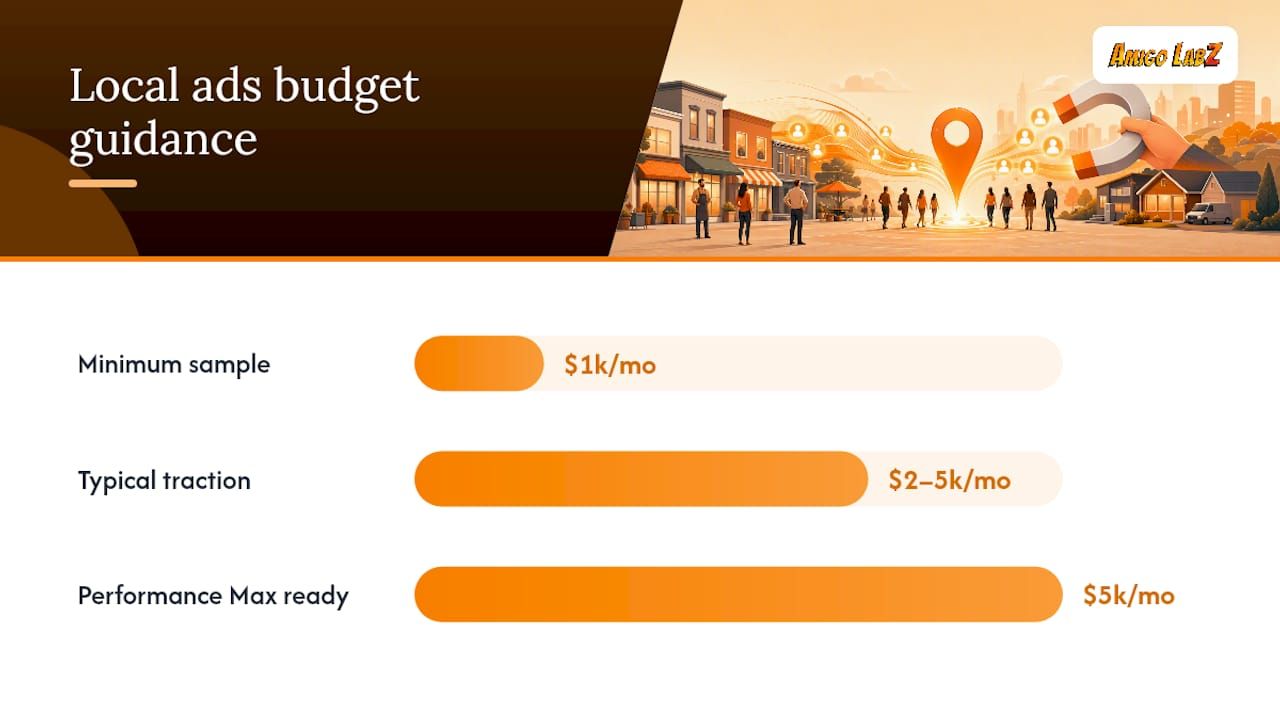
There's no universal minimum, but patterns show up across local service categories. Most businesses need at least $1,000 a month to generate a usable sample of leads, and a lot of local advertisers find their real traction in the $2,000 to $5,000 range, according to industry guidance on competing against bigger-budget rivals. Below $1,000, you're often too thin to get statistically meaningful lead data before you have to make budget decisions.
A workable sequence for most small service businesses:
- Month one to two: Run LSAs only, conservative budget, focus entirely on response time and review collection
- Month three: Increase LSA budget once cost-per-lead stabilizes and you know your close rate
- Month four and beyond: Layer in a tightly focused Search campaign targeting a handful of high-value keywords, keeping total spend split roughly 60/40 in favor of LSAs if lead quality is strong
Watch for cannibalization once both are running. If your Search campaign is generating clicks for branded terms or your own business name, you're often just paying for traffic that would have found you anyway through your LSA listing or organic profile.
Some guides recommend holding off on Performance Max campaigns until your monthly budget clears $5,000, since automated broad-match campaigns tend to waste spend at smaller scale before you have enough conversion data to guide them.
Seasonal trades need extra flexibility. An HVAC company should expect to shift 30% or more of its annual budget into the two or three months before peak season, then pull back hard in the shoulder months.
How Amigolabz Preps and Optimizes Local Services Ads for Clients
Verification approval and lead quality both trace back to groundwork most businesses skip. Amigolabz starts every LSA engagement by auditing the client's Google Business Profile and licensing documents before submitting anything, since a mismatched business name is the single fastest way to add two weeks to approval.
The pre-launch checklist typically covers:
- Cross-checking business name, address, and license numbers against every public record
- Seeding a review request sequence with recent customers before the account goes live
- Cleaning up service categories and photos on the Google Business Profile
- Setting call routing through a dedicated tracking number from day one
- Starting with conservative weekly lead caps and a two-week tuning window before scaling spend
- Building response-time SLAs into the client's intake process so leads get answered inside minutes, not hours
That operational discipline in the first 30 days is usually what separates an LSA account that plateaus from one that keeps producing leads at a stable cost per month after month.
What Realistic Local Services Ads Results Look Like
LSAs tend to produce the highest-intent leads a service business will ever get from digital advertising, because someone calling from an LSA listing has already decided they want a professional and picked yours off a short, trust-badged list. That's a different buyer than someone scrolling a Search results page comparing five tabs.
The catch is that LSAs punish unpreparedness fast. A business with thin reviews, slow response times, or a mismatched service area will burn budget on leads it can't close, then blame the platform. The fix usually isn't more spend. It's fixing the fundamentals first.
Hiring an agency like Amigolabz makes sense once you've hit a ceiling you can't manage part time, verification is stuck, or your response process can't keep pace with lead volume. Below that point, most small businesses can run a lean LSA account themselves with a couple hours a week.
— John
Get Your Local Services Ads Verified and Optimized
Verification paperwork, license mismatches, and review gaps are exactly where most local businesses lose two or three weeks they can't get back. Amigolabz handles the setup work directly: Google Business Profile cleanup, license and insurance documentation, and the ongoing review and response process that keeps your LSA ranking climbing instead of stalling.

Amigolabz manages this for clients across New Jersey and Nevada, pairing Google Ads management with the Google Business Profile optimization that verification actually depends on. If your listing needs a cleanup before you apply, or your current LSA account has stalled on lead quality, book a call to discuss potential obstacles to approval or performance and possible solutions.
Sources
For readers who want to verify specifics directly at the source:
FAQ
How much does it cost to advertise locally on Google?
Local Services Ads charge per lead, commonly ranging from around $15 to over $50 depending on trade and market, while regular Google Ads charge per click, averaging $5.42 per click across accounts WordStream tracks.
How do I advertise locally on Google?
Eligible service businesses should apply for Local Services Ads by claiming a profile, submitting licenses and insurance, and passing Google's verification process, then add Search campaigns once LSAs are producing steady leads.
Is $10 a day enough for Google Ads?
Budgets below $1,000 a month are usually too thin to generate meaningful lead volume for most local service categories; most local advertisers see real traction starting closer to $1,000 a month.
Is Google local ads worth it?
For eligible phone-first or in-home service businesses, Local Services Ads tend to produce high-intent leads at a predictable cost, since you pay only when a customer actually contacts you rather than for every click.
Recommended