What Is Website Optimization? a 2026 Guide for SMBs
What Is Website Optimization? a 2026 Guide for SMBs
TL;DR:
- Website optimization involves continuously enhancing speed, content, and user experience to increase visitor engagement and revenue. It encompasses technical performance, SEO, UX, and conversion strategies, with recent updates emphasizing real user data and AI-driven search factors. Regular monitoring and iterative improvements are essential for maintaining optimal site performance and search rankings.
Most business owners assume website optimization means tweaking a few keywords and calling it done. It's actually much broader than that. What is website optimization, in practical terms? It's the ongoing process of improving your site's speed, content, structure, and user experience so that more visitors find you, stay longer, and take action. Done right, it directly grows your revenue. This guide breaks down exactly what that looks like in 2026, including the latest Google updates that affect your rankings whether you know about them or not.
Table of Contents
- Key takeaways
- What website optimization actually means
- Performance techniques that move the revenue needle
- Core Web Vitals: the 2026 scoring change you cannot ignore
- On-page SEO and content that works in 2026
- Measuring and maintaining your optimization gains
- My honest take on what actually works for SMBs
- Let Amigolabz handle the heavy lifting
- FAQ
Key takeaways
| Point | Details |
|---|---|
| Optimization goes beyond SEO | Website optimization covers speed, usability, content quality, and conversions, not just search rankings. |
| Speed directly affects revenue | A one-second delay can cut conversion rates by 20%, making performance a financial priority. |
| Core Web Vitals now score as a group | Since March 2026, Google scores LCP, INP, and CLS together, so fixing one metric is no longer enough. |
| Mobile-first is non-negotiable | Over 60% of web traffic comes from mobile devices, meaning mobile performance must lead your strategy. |
| Real user data beats lab scores | Google ranks sites based on actual user experience data, not just Lighthouse scores from a desktop test. |
What website optimization actually means
Website optimization is the practice of making deliberate, measurable improvements across every part of your site so it performs better for both users and search engines. Speed is one piece of it. So is SEO, content quality, design clarity, and conversion rate optimization (CRO). They all work together.
Here's a helpful way to think about it: your website is your best salesperson. Website optimization is the training, grooming, and tools you give that salesperson to close more deals.
The core components break down like this:
- Speed and technical performance: How fast pages load and respond to user interactions
- Search engine optimization (SEO): How easily search engines find, understand, and rank your pages
- User experience (UX): How intuitive and frictionless the site feels to a real visitor
- Conversion rate optimization (CRO): How effectively your site turns visitors into leads or buyers
The distinction between website optimization and SEO is worth clarifying. SEO is one tool inside the larger optimization toolbox. You can have great SEO and still lose customers because your pages load slowly or your checkout form is confusing. What is web performance optimization? It's the technical side of this picture, focused specifically on speed and stability metrics that affect both rankings and user satisfaction.
Google's 2026 algorithm updates have also made it impossible to ignore AI-driven search. AI Overviews now appear in roughly 30% of queries, meaning your content needs to be structured for trust and citation by these AI systems, not just for traditional keyword matching.
| Component | What it affects | Key metric to track |
|---|---|---|
| Page speed | Rankings and conversions | Core Web Vitals scores |
| On-page SEO | Search visibility | Organic click-through rate |
| UX and design | Engagement and bounce rate | Time on page, scroll depth |
| CRO | Revenue from existing traffic | Conversion rate by page |
Performance techniques that move the revenue needle
Speed is where most SMBs leave money on the table. A one-second page load delay reduces conversions by 20%. That's not a minor inconvenience. That's a direct hit to your bottom line every single day.
Here are 15 proven techniques for website performance improvement in 2026:
- Switch image formats from JPEG or PNG to WebP or AVIF. WebP reduces file sizes by 25 to 35%, while AVIF can cut them by up to 50%.
- Enable lazy loading so images below the fold only load when a visitor scrolls to them.
- Minify CSS, JavaScript, and HTML to remove unnecessary characters from your code.
- Use a Content Delivery Network (CDN) to serve your site from servers closer to each visitor's location.
- Enable browser caching so returning visitors load your site faster.
- Reduce server response time by upgrading hosting or optimizing your database queries.
- Compress files using Gzip or Brotli before they are sent to the browser.
- Eliminate render-blocking resources that delay when your page becomes visible.
- Use preloading for critical resources like fonts and hero images.
- Defer non-critical JavaScript so it loads after the main content.
- Reduce third-party scripts. Every analytics plugin, chat widget, and ad tracker adds load time.
- Optimize web fonts by using only the weights you need and enabling font-display: swap.
- Implement HTTP/2 or HTTP/3 for faster parallel loading of resources.
- Use a server-side caching plugin if you are on WordPress.
- Set performance budgets and test every code deployment against them.
Mobile traffic represents over 60% of web visits, so mobile-first optimization is not optional. Test on real devices, not just browser simulators. A 1-second mobile speed gain can boost e-commerce conversions by 27%. For SaaS businesses, that same improvement averages a 7% conversion lift. Those numbers compel action.
Pro Tip: Don't try to fix all 15 techniques at once. Run a Google PageSpeed Insights report, find your lowest-scoring items, and tackle the ones with the highest impact first. Image optimization and removing unused third-party scripts typically deliver the fastest gains with the least technical effort.

If you want to understand how conversion-focused design ties into speed improvements, Amigolabz has a detailed breakdown on boosting website conversions that pairs well with these performance fixes.
Core Web Vitals: the 2026 scoring change you cannot ignore
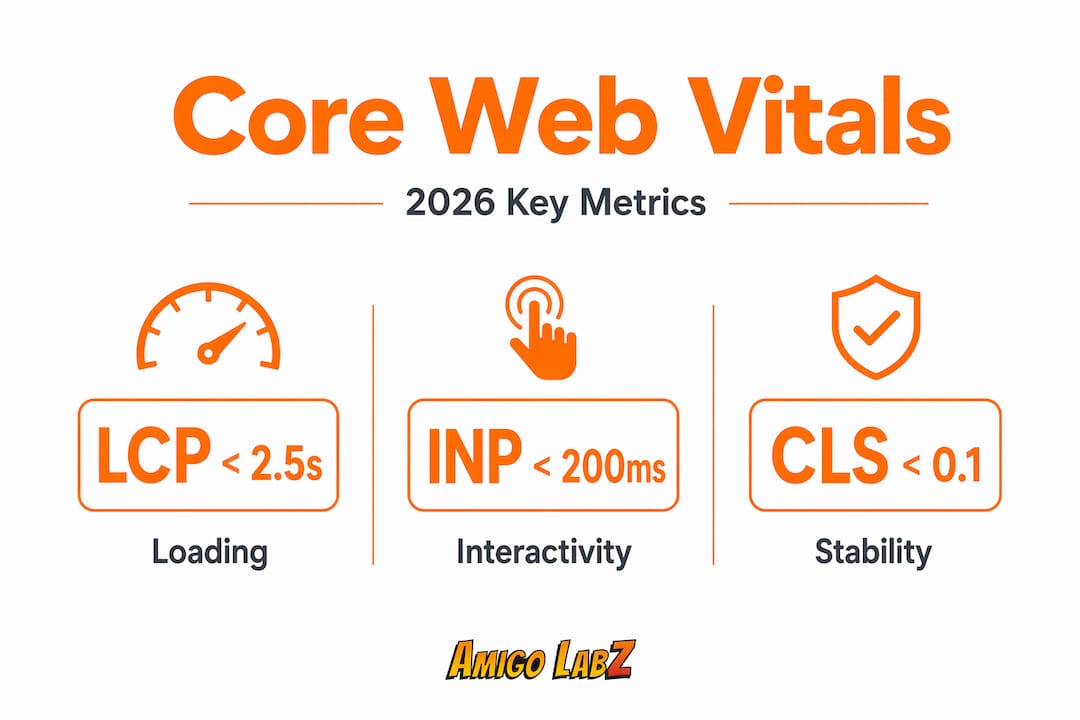
Core Web Vitals are Google's three primary metrics for measuring real-world page experience. As of March 2026, Google now uses a composite signal that combines all three into a single performance score. One bad metric drags down the whole signal. You have to optimize all three.
Here's what each metric measures and what the passing thresholds are:
- LCP (Largest Contentful Paint): How fast the main content of your page loads. You need this under 2.5 seconds.
- INP (Interaction to Next Paint): How quickly your page responds to user clicks and inputs. Target under 200 milliseconds.
- CLS (Cumulative Layout Shift): How stable your page layout is while it loads. Keep this score below 0.1.
To fix LCP, start by identifying the element Google flags as your largest contentful paint. Usually it's a hero image or headline. Preload that asset and make sure it's not lazy-loaded by accident.
To fix INP, audit your JavaScript execution. Heavy scripts that run on the main thread delay responses. Break them into smaller tasks using techniques like code splitting or moving work off the main thread with web workers.
To fix CLS, reserve space for every dynamic element before it loads. CSS aspect-ratio containers effectively prevent layout jumps caused by ads, embeds, or images that load without defined dimensions. This is one of the most overlooked fixes in SMB website optimization.
Pro Tip: Most small business owners run Lighthouse and assume that score represents what Google sees. It doesn't. Google ranks sites using CrUX real user data at the 75th percentile, meaning your slowest users determine your ranking signal. Always check your Core Web Vitals report in Google Search Console for field data, not just lab results.
| Metric | Good | Needs Work | Poor |
|---|---|---|---|
| LCP | Under 2.5s | 2.5s to 4s | Over 4s |
| INP | Under 200ms | 200ms to 500ms | Over 500ms |
| CLS | Under 0.1 | 0.1 to 0.25 | Over 0.25 |
On-page SEO and content that works in 2026
Techniques for website optimization go well beyond the technical layer. Your content and on-page SEO choices shape whether Google trusts your site and whether visitors actually read what you've written.
Start with the fundamentals every page needs:
- A descriptive, keyword-relevant title tag under 60 characters
- A single H1 heading that clearly states what the page covers
- Meta description written to earn clicks, not just include keywords
- Internal links to related pages so both users and crawlers can move through your site logically
- Structured data markup to help Google display rich results like ratings, FAQs, or event details
Content quality has become more consequential than it was two years ago. Google's E-E-A-T framework (Experience, Expertise, Authoritativeness, Trustworthiness) now plays a measurable role in how content is ranked. Authentic, unique content aligned to user intent outperforms surface-level articles padded with keywords every time.
Organizing content for AI Overviews is increasingly important. Structure your pages with clear headings, direct answers near the top of each section, and factual claims that can be verified. But skip the gimmicks. Google specifically warns against unnecessary "chunking" or llms.txt files as shortcuts for AI visibility. Write for people first and let the structure do the rest.
Adding structured data to your pages is one of the most underleveraged SEO moves available to small business owners. It tells search engines exactly what your content is about and can result in enhanced search result appearances that get significantly higher click-through rates.
For a content planning framework that supports SEO goals, the content creation checklist from Amigolabz is worth bookmarking.
Measuring and maintaining your optimization gains
Improving your site once is not enough. Optimization is a process, not a project. Websites drift. Plugins update. New content gets added without performance checks. Without a monitoring system, you will lose the gains you worked hard to build.
Here's a practical monitoring workflow:
- Google Search Console: Check the Core Web Vitals report monthly. It shows field data from real visitors, broken down by mobile and desktop.
- PageSpeed Insights: Run individual pages through this tool when you publish new content or make design changes.
- Lighthouse: Use it in Chrome DevTools for detailed diagnostics during development. Remember it's lab data, not a ranking signal on its own.
- Google Analytics 4: Monitor bounce rates, session duration, and conversion rates by landing page to catch UX issues before they compound.
Performance budgets integrated into CI/CD pipelines prevent the slow accumulation of small regressions that add up to a noticeably slower site over time. If your development team pushes code changes, automated tests can flag any build that exceeds your load time or Core Web Vitals thresholds before it goes live. This is not just for enterprise companies. Plenty of SMB-friendly tools like Netlify and Vercel support this out of the box.
Pro Tip: Set a calendar reminder to run a full site audit every 90 days. Use Google Search Console's coverage report alongside Core Web Vitals to catch both SEO and performance issues in one session. Quarterly reviews catch problems early before they start affecting your traffic.
My honest take on what actually works for SMBs
I've seen a lot of small business owners chase the wrong things. They spend weeks chasing a perfect Lighthouse score of 100 while their product pages have no clear calls to action and their site looks broken on a Samsung Galaxy phone. The score is a means to an end, not the end itself.
What I've learned from working with SMBs is that the biggest wins almost always come from fixing obvious friction. Pages that load in under three seconds, content that answers the exact question a visitor searched for, and a checkout or contact form that actually works on mobile. That combination outperforms any collection of micro-optimizations done in isolation.
The other mistake I see constantly is treating SEO as a one-time project. You do not "finish" SEO for website optimization. Search behavior changes. Your competitors update their sites. Google releases algorithm updates like the March 2026 composite scoring change. If you are not watching your data and adjusting, you are falling behind even while standing still.
My advice: pick three things from this article that you can fix this month. Start with speed, because it affects every other metric. Then move to content quality, then structured data. Build the habit of reviewing your Search Console data regularly. You don't need a big budget to make meaningful progress. You need consistency and the willingness to act on what the data tells you.
— John
Let Amigolabz handle the heavy lifting
Getting all the moving parts of website optimization right takes real time and technical know-how. Amigolabz works with small and medium-sized business owners across New Jersey and Nevada to build and maintain websites that perform at a high level.

From SEO services that improve your search rankings to tailored website solutions that address speed, structure, and conversion performance, Amigolabz builds strategies around your specific business goals, not generic templates. The team also runs Google Ads and Facebook Ads campaigns to amplify your organic growth with paid traffic that converts. If you want a partner who treats your site like it matters, reach out and book a consultation today.
FAQ
What is website optimization in simple terms?
Website optimization is the process of improving your site's speed, content, and structure so more visitors find it, enjoy using it, and take action. It covers SEO, performance, user experience, and conversion rate improvements together.
How does website optimization affect my Google rankings?
Google uses Core Web Vitals, page relevance, and E-E-A-T signals to rank pages. Since March 2026, all three Core Web Vitals metrics are scored as a composite signal, meaning poor performance in any one area can hurt your overall rankings.
How long does it take to see results from optimization?
Technical fixes like speed improvements can show results within a few weeks in Google Search Console. Content and SEO changes typically take one to three months to reflect in rankings and organic traffic.
What tools should I use to measure website performance?
Google Search Console, PageSpeed Insights, and Lighthouse are the three most practical tools for small business owners. Always prioritize the field data in Search Console over lab-based scores when assessing your actual ranking signal.
Is website optimization a one-time task or ongoing?
It's ongoing. Search algorithms update, your content ages, and new code can introduce performance regressions. Quarterly audits and monthly Search Console reviews are the minimum to maintain the gains you've made.
Recommended